On-Premise Installation Guide
This document outlines the pre-deployment prerequisites, verification steps, and considerations required for the successful On-Premise installation and deployment of the EKB product. It is intended to serve as a comprehensive checklist to ensure that the client’s environment is properly configured and meets all necessary requirements before proceeding with the deployment.
Prerequisites
Access Requirements
- Server Access:
- Confirm access to deployment servers with sudo privileges.
- Verify that all necessary network routes are established via a secure VPN or dedicated network configuration.
- User Permissions:
- Ensure that the deployment team has been granted the necessary access rights.
- Validate that any required two-factor authentication (2FA) or security tokens are in place.
System Requirements
Operating System:
Ubuntu 22 or RHEL 8.10
Hardware Specifications:
For each deployment tier, ensure that the hardware meets or exceeds the following:
| Tier | Cores | RAM (GB) | SSD |
|---|---|---|---|
| SMALL | 16 | 64 | 1TB |
| MEDIUM | 32 | 128 | 2TB |
| LARGE | Custom | Custom | Custom |
- GPU (Required when deploying an LLM on the same machine as the EKB platform.)
- SMALL: ~500 (100 Concurrent) users can be supported by a single VM 16 cores, 64gb ram, 1 TB SSD these machines cost ~$600 per month. This is a minimum size deployment.
- MEDIUM ~ 2000 (500 Concurrent) users can be supported by a larger machine 32 cores, 128gb ram, 2 TB SSD these machines are around ~$1,200 per month
- LARGE: ~10000 (1000+ Concurrent) users should be deployed across containers so that the infrastructure can scale to support the needs, this typically costs a minimum of $2,000 per month. It is suggested to calculate $2,000 per month per additional 1,000 Active Users. This is a fully distributed deployment.
Deployment Tools & Software Dependencies
- Deployment Scripts:
- Verified and version-controlled Bash deployment scripts.
- Dependency Management Tools:
- Python 3
- Git (current version)
- Docker (v27.1.1) or Podman
- Additional Tools (Optional):
- Logging and monitoring tools (e.g., ELK Stack, Prometheus, Grafana) as per the client’s monitoring requirements.
Credentials and Keys
- Server Credentials:
- Ensure that all server access credentials are up to date and securely stored.
- Application API Keys and Licenses:
- Verify that all application-specific API keys and licenses (e.g., OpenAI, SERP, Sentry) are available and valid.
Pre-Deployment Checklist
Hardware and System Verification
Ensure that the client’s hardware and system configurations match the specifications:
# Check CPU Information

lscpu                         # Works on both Ubuntu and RHEL

cat /proc/cpuinfo             # More detailed CPU information


# Check Memory Usage

free -h                       # Human-readable format for memory usage

cat /proc/meminfo             # Detailed memory information


# Check Storage Usage

df -h                         # Displays disk usage

lsblk                         # Lists block devices and partitions
3.2 Software and Dependency Verification
Verify that all necessary software components are installed and correctly versioned:
# Check Docker Version

docker --version              # Applicable for both Ubuntu and RHEL


# Check Docker Compose Version

docker compose version        # For modern Docker setups

docker-compose --version      # For older installations

```

# Check Python Version

python3 --version             # Preferred check for Python 3

python --version              # Alternative if python3 is not available


# Check Git Version

git --version                 # Valid for both Ubuntu and RHEL
3.3 Network and Connectivity Check
Ensure the network is correctly configured and that there is adequate internet connectivity for external dependencies or updates:
# Check Internet Connection Availability

ping -c 4 google.com          # Ping Google to verify network connectivity

curl -Is https://www.google.com | head -n 1  # Alternative check using curl
3.4 Additional Verifications
Services and ports
| Service | Path | Parameter | Internal ports | External ports |
|---|---|---|---|---|
| Frontend | / | FRONTEND_SUFFIX | 3000 | — |
| Nginx | / | — | — | 80, 443 |
| Backend | /backend | BACKEND_SUFFIX | 8001 | — |
| Automator | /automator | AUTOMATOR_SUFFIX | 8002 | — |
| Redis | — | — | 6379 | — |
| RabbitMQ | — | — | 5672, 15672 | — |
| Supabase Kong API Gateway | /supabase | SUPABASE_SUFFIX | 8000, 8443 | 8000, 8443 (admin only) |
| Supabase Postgres | — | — | 6543 | — |
| PostgreSQL (automator) | — | — | 5433 | — |
| Redis (automator) | — | — | 6380 | — |
| Ollama | — | — | 11434 | — (only if deploying Ollama locally) |
Protocol support
| Service | HTTP | HTTPS | WebSocket |
|---|---|---|---|
| Frontend | ✓ | ✓ | — |
| Nginx | ✓ | ✓ | — |
| Backend | ✓ | ✓ | — |
| Automator | ✓ | ✓ | — |
| Redis | ✓ | ✓ | — |
| RabbitMQ | ✓ | ✓ | — |
| Supabase Kong API Gateway | ✓ | ✓ | ✓ |
| Supabase Postgres | ✓ | ✓ | — |
| PostgreSQL (automator) | ✓ | ✓ | — |
| Redis (automator) | ✓ | ✓ | — |
| Ollama | ✓ | ✓ | — |
Notes: All internal machines must be able to communicate freely with each other. We recommend using SSL (HTTPS) connections; HTTP is supported during PoCs.
Firewall and Security Settings:
Validate that firewall rules or security groups allow for required traffic.
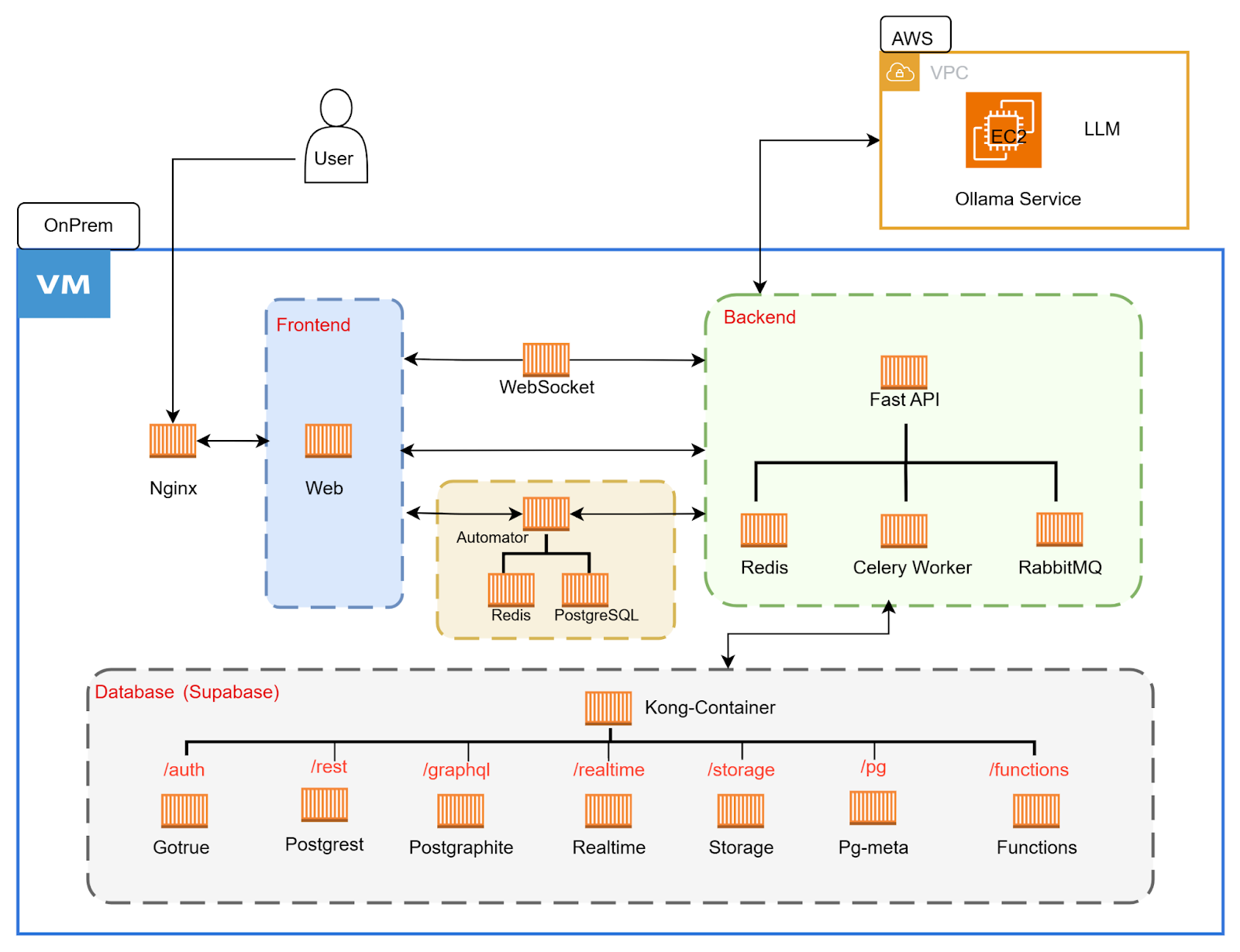
General Architecture
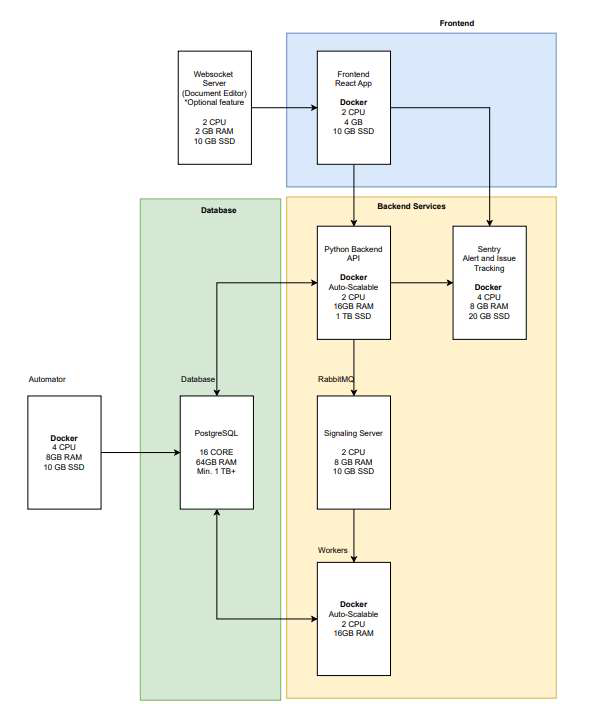
Architecture Diagram – On-Premise
Deployment architecture flow for single virtual machine box with mentioned prerequisite resource allocation
Deployment architecture flow for AWS Cloud deployment
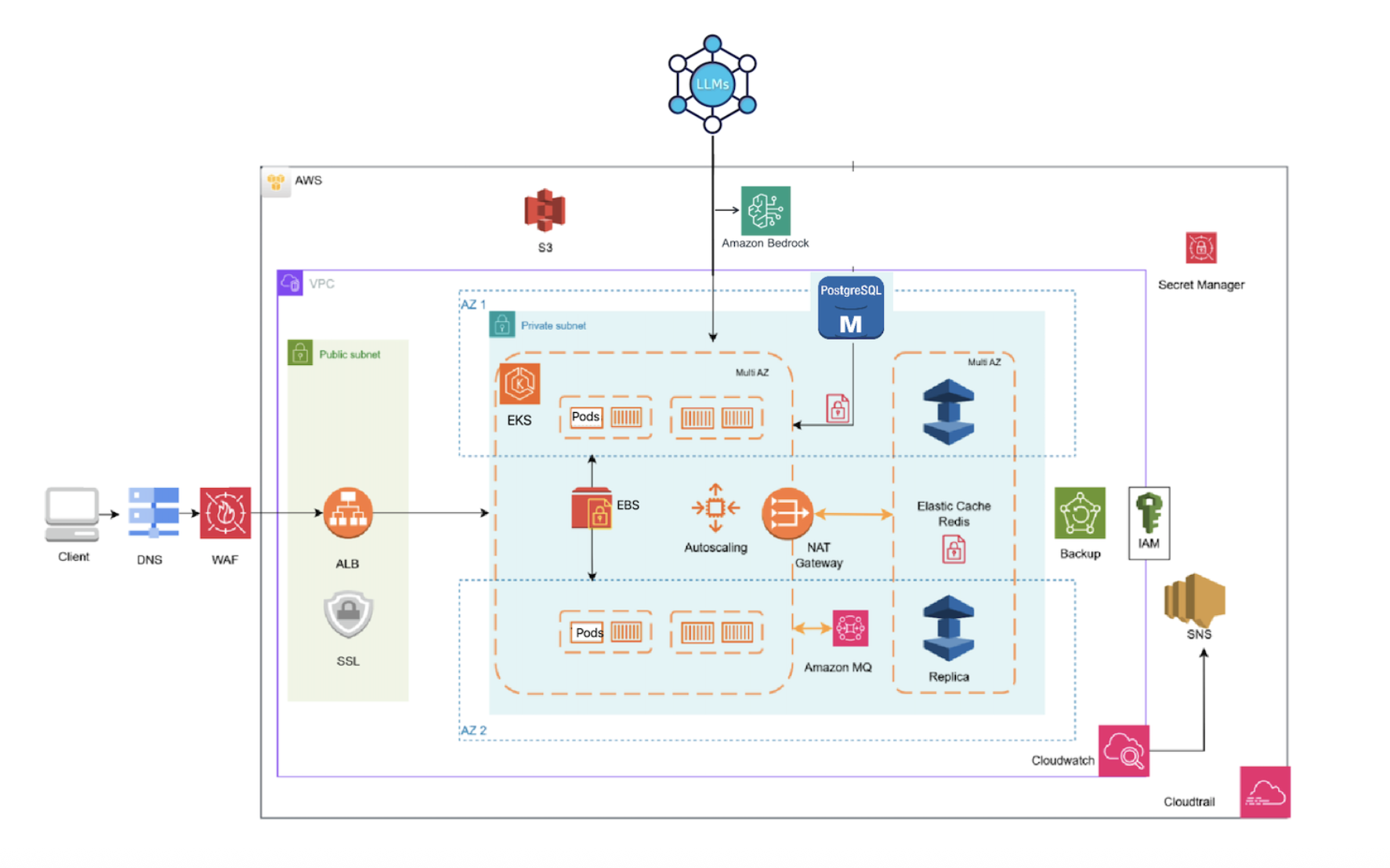
The above architecture is a highly available, scalable, cloud-native environment on AWS, designed for 500+ users with enterprise-grade reliability for EKB.
1. Security & Edge Protection
- Web Application Firewall (WAF) — Protects against malicious traffic, DDoS attacks, and common web vulnerabilities
- SSL/TLS Termination — Ensures secure communication between clients and the application
- DNS Management — Handles domain resolution and traffic routing
2. Load Balancing & Traffic Distribution
- Application Load Balancer (ALB) — Distributes incoming traffic across multiple application instances
- Multi-AZ Deployment — Ensures high availability by spreading resources across multiple availability zones
- Health Checks — Automatically detects and routes traffic away from unhealthy instances
3. Container Orchestration (EKS)
- Kubernetes Cluster — Manages containerized applications with automatic scaling and failover
- Multi-AZ Pod Distribution — Application pods are distributed across availability zones for fault tolerance
- Auto-scaling — Automatically scales resources up or down based on demand
- Service Discovery — Enables seamless communication between application components
4. Data Layer
- PostgreSQL Database (RDS) — Multi-AZ managed database with automatic failover and backups
- Redis Cache (ElastiCache) — High-performance in-memory caching for improved application speed
- Message Queue (Amazon MQ) — Handles asynchronous processing and communication between services
5. Storage & Backup
- S3 Object Storage — Scalable storage for files, backups, and static content
- EBS Block Storage — Persistent storage for application data
- Automated Backups — Regular snapshots and point-in-time recovery capabilities
6. Monitoring & Operations
- CloudWatch — Real-time monitoring, logging, and alerting
- CloudTrail — Audit logging for compliance and security
- SNS Notifications — Automated alerts for critical events
7. Security & Access Management
- IAM — Centralized access control and permissions management
- Secrets Manager — Secure storage and rotation of database credentials and API keys
- VPC Isolation — Network-level security with private subnets
8. LLM Integration
- AWS Bedrock — Native AWS service for Large Language Model integration
- Model Variety — Access to Claude 3, Titan, Llama 2, and other models