General
Open My Account → General to manage your personal profile, language, workspace, and account-level actions.
Every user sees General, API Keys, My Prompts, and (on a team) Dashboard. The remaining Team tabs are visible to team admins only.
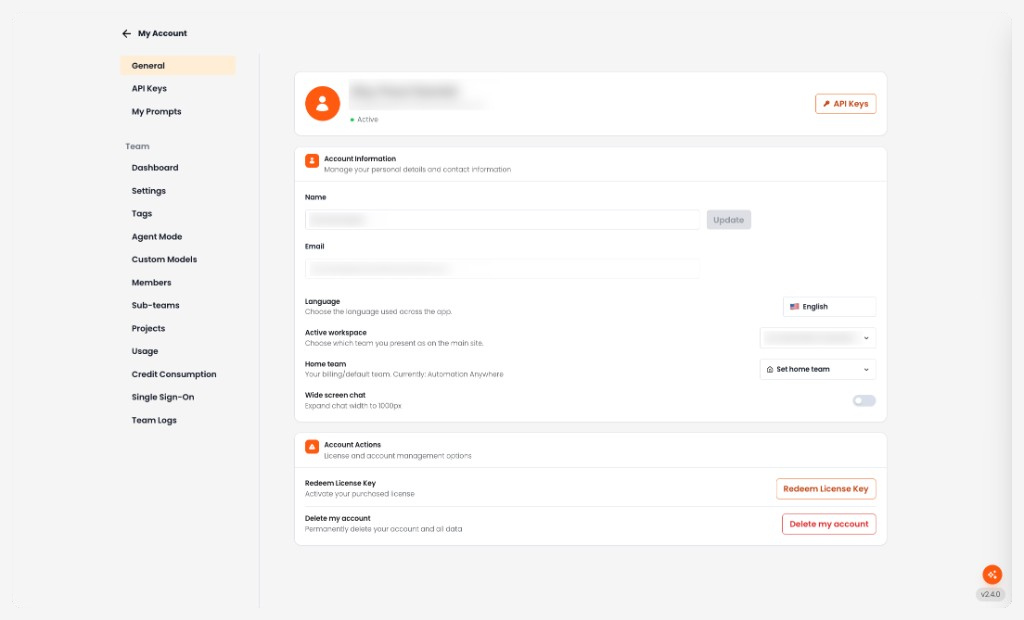
Profile Header
At the top of the page you see:
- Your name and email
- Status (for example, Active)
- API Keys — shortcut to API Keys
Account Information
Manage your personal details and contact information.
-
Name Your display name. Edit it and click Update to save.
-
Email The registered email address. This field is read-only.
-
Language Language used across the app. Options are English, Japanese, and Korean.
-
Active workspace Which team you present as on the main site. Shown when you belong to more than one team and you are not on a team subdomain. Switching reloads the app into that team.
-
Home team Your billing/default team. Shown when you belong to another non-free team you can switch to. Click Set home team, choose a team, and confirm. If your current home is a free workspace, projects you own move to the new home and the free workspace is removed.
-
Wide screen chat Expand chat width to 1000px.
If a team admin has set a personal credit limit for you, Credit Usage (This Billing Period) also appears here. It shows credits used versus your limit for the current billing cycle.
Account Actions
License and account management options.
-
Redeem License Key Activate a purchased license.
-
Delete my account Permanently delete your account and all data. This cannot be undone.