> ## Documentation Index
> Fetch the complete documentation index at: https://ai-kb.automationanywhere.com/llms.txt
> Use this file to discover all available pages before exploring further.
# Custom Models
> Add team-wide custom LLM models available in every project
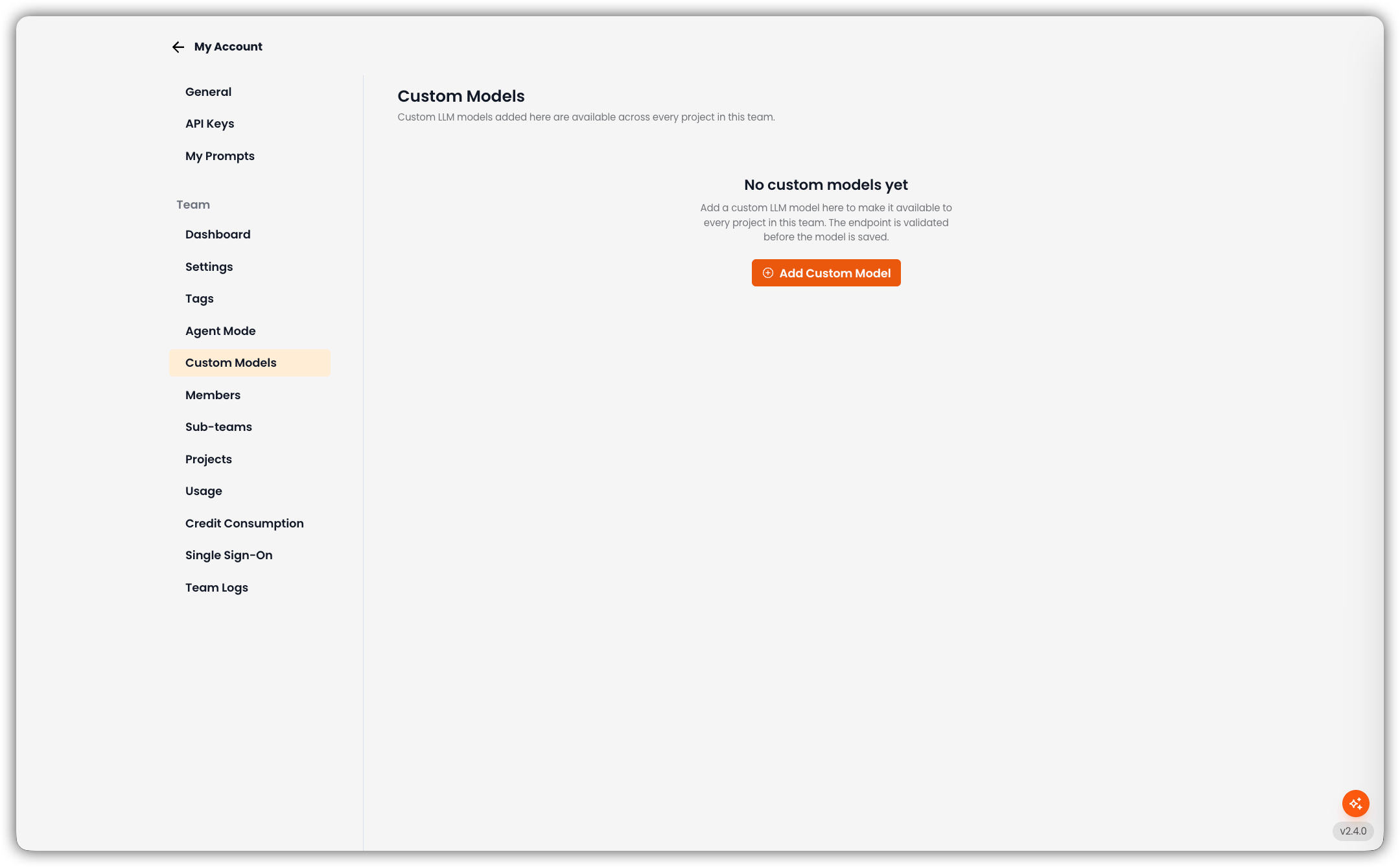
Open **My Account → Custom Models** to add custom LLM connections that every project on this team can use.
Models you add here are **team-scoped**. They show up for agents in all projects on the team. Project-only custom models are still configured on the agent; see [Predefined and Custom Models](/agents/models).
The endpoint is validated before the model is saved.
 Only team admins can open this tab and add, edit, or delete team custom models.
## Empty State
If the team has no custom models yet, the page shows **No custom models yet** and **Add Custom Model**.
## Add a Custom Model
The **New Connection** dialog opens.
Only team admins can open this tab and add, edit, or delete team custom models.
## Empty State
If the team has no custom models yet, the page shows **No custom models yet** and **Add Custom Model**.
## Add a Custom Model
The **New Connection** dialog opens.
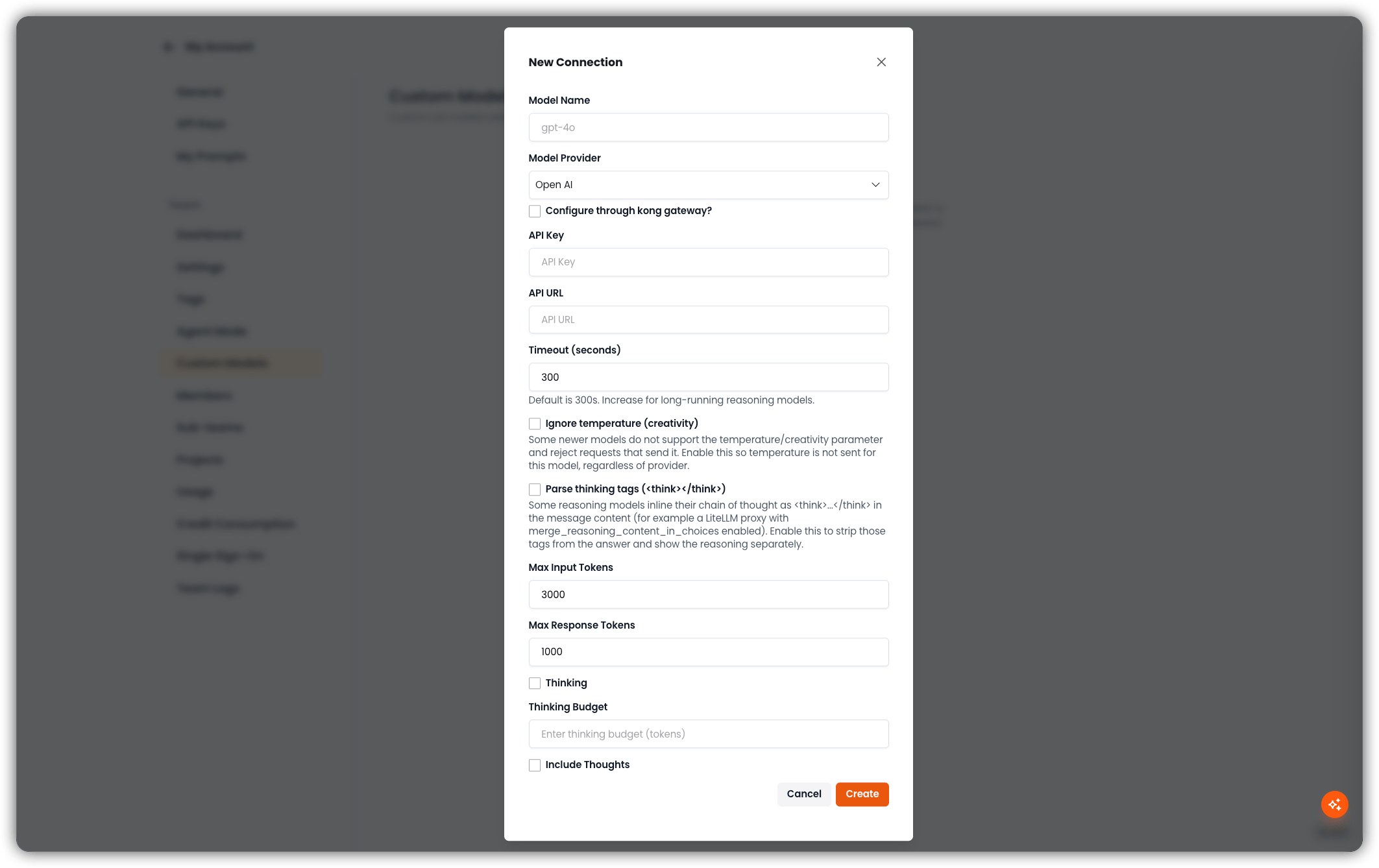 | Field | Description |
| ---------------------------------------------- | ---------------------------------------------------------------------------------------------------------------------------------------------------------------------------------------------------------------------------------------------------------------- |
| **Model Name** | Identifier the API expects (for example `gpt-4o`) |
| **Model Provider** | Provider from the dropdown (for example Open AI) |
| **Configure through kong gateway?** | Optional. Route the connection through the Kong gateway. |
| **API Key** | Provider key. Stored securely. |
| **API URL** | API endpoint |
| **Timeout (seconds)** | Default is **300**. Increase for long-running reasoning models. |
| **Ignore temperature (creativity)** | Some newer models reject requests that send a temperature/creativity parameter. Enable this so temperature is not sent for this model, regardless of provider. |
| **Parse thinking tags (``/``)** | Some reasoning models inline a chain of thought as `…` in the message content (for example a LiteLLM proxy with `merge_reasoning_content_in_choices` enabled). Enable this to strip those tags from the answer and show the reasoning separately. |
| **Max Input Tokens** | Default **3000** |
| **Max Response Tokens** | Default **1000** |
| **Thinking** | Enable provider thinking/reasoning for this model. |
| **Thinking Budget** | Token budget for thinking, when **Thinking** is on. |
| **Include Thoughts** | Include the model's thoughts in the response. |
Other provider-specific fields (Azure API version, AWS timeout, custom auth headers, dynamic token fetching) appear when that provider is selected.
Click **Create**. EKB validates the endpoint; on success the model is stored for the team. **Cancel** closes the dialog without saving.
## Model List
When at least one model exists, the page shows a search box (**Search by name or provider...**) and a table:
| Column | Description |
| ---------------- | ------------------- |
| **Name** | Model name |
| **Provider** | Provider label |
| **Max Input** | Max input tokens |
| **Max Response** | Max response tokens |
| **Actions** | Edit or delete |
If search matches nothing: *No models match your search.*
## Edit or Delete
* **Edit** reopens the same form with the current values.
* **Delete** asks for confirmation, then removes the team model.
Team models cannot be edited from a project's custom-model list. There they appear as read-only with **Managed in team settings**.
## Related
* [Predefined and Custom Models](/agents/models) — catalog of built-in models and project-level BYOK
* [Agent Mode](/my-account/agent-mode)
| Field | Description |
| ---------------------------------------------- | ---------------------------------------------------------------------------------------------------------------------------------------------------------------------------------------------------------------------------------------------------------------- |
| **Model Name** | Identifier the API expects (for example `gpt-4o`) |
| **Model Provider** | Provider from the dropdown (for example Open AI) |
| **Configure through kong gateway?** | Optional. Route the connection through the Kong gateway. |
| **API Key** | Provider key. Stored securely. |
| **API URL** | API endpoint |
| **Timeout (seconds)** | Default is **300**. Increase for long-running reasoning models. |
| **Ignore temperature (creativity)** | Some newer models reject requests that send a temperature/creativity parameter. Enable this so temperature is not sent for this model, regardless of provider. |
| **Parse thinking tags (``/``)** | Some reasoning models inline a chain of thought as `…` in the message content (for example a LiteLLM proxy with `merge_reasoning_content_in_choices` enabled). Enable this to strip those tags from the answer and show the reasoning separately. |
| **Max Input Tokens** | Default **3000** |
| **Max Response Tokens** | Default **1000** |
| **Thinking** | Enable provider thinking/reasoning for this model. |
| **Thinking Budget** | Token budget for thinking, when **Thinking** is on. |
| **Include Thoughts** | Include the model's thoughts in the response. |
Other provider-specific fields (Azure API version, AWS timeout, custom auth headers, dynamic token fetching) appear when that provider is selected.
Click **Create**. EKB validates the endpoint; on success the model is stored for the team. **Cancel** closes the dialog without saving.
## Model List
When at least one model exists, the page shows a search box (**Search by name or provider...**) and a table:
| Column | Description |
| ---------------- | ------------------- |
| **Name** | Model name |
| **Provider** | Provider label |
| **Max Input** | Max input tokens |
| **Max Response** | Max response tokens |
| **Actions** | Edit or delete |
If search matches nothing: *No models match your search.*
## Edit or Delete
* **Edit** reopens the same form with the current values.
* **Delete** asks for confirmation, then removes the team model.
Team models cannot be edited from a project's custom-model list. There they appear as read-only with **Managed in team settings**.
## Related
* [Predefined and Custom Models](/agents/models) — catalog of built-in models and project-level BYOK
* [Agent Mode](/my-account/agent-mode)