> ## Documentation Index
> Fetch the complete documentation index at: https://ai-kb.automationanywhere.com/llms.txt
> Use this file to discover all available pages before exploring further.
# Confluence
> Wiki pages and documentation management
## Configuración
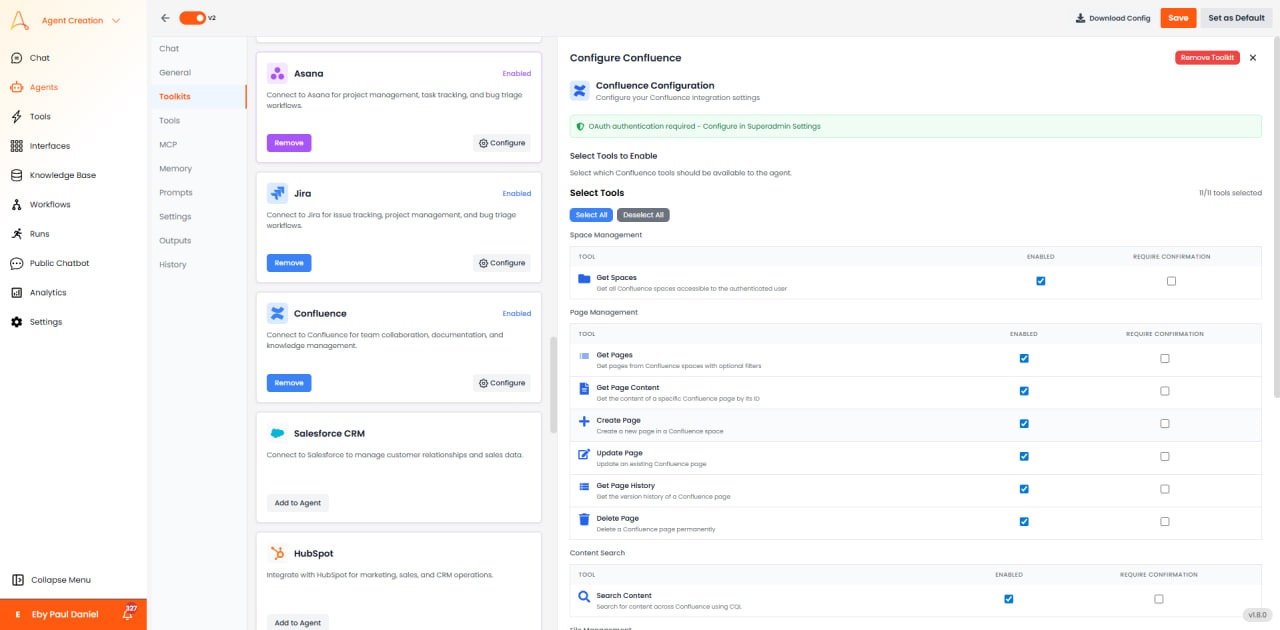
 * **OAuth Authentication Required**: Configure in Superadmin Settings
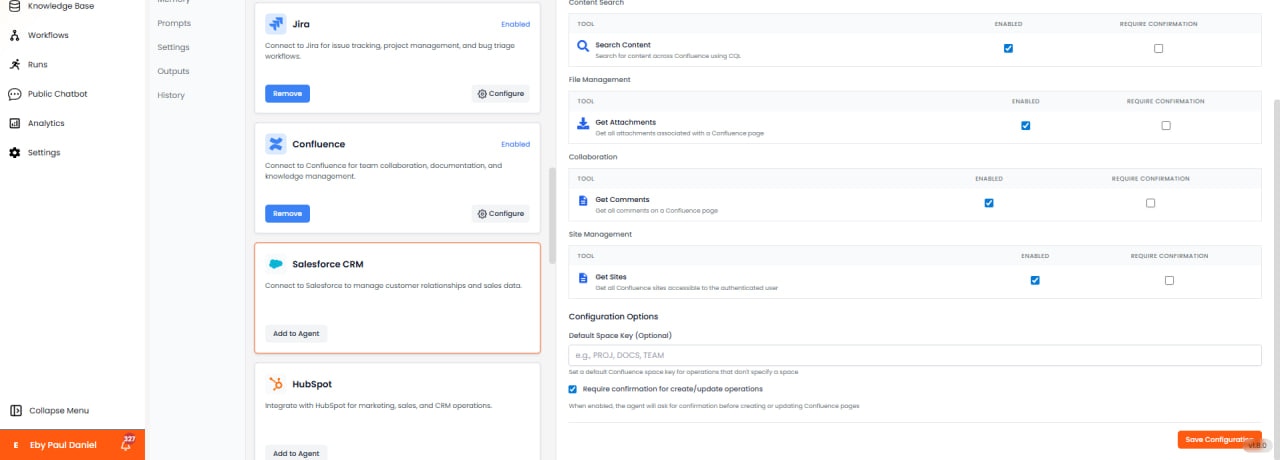
* **Default Space Key**: Optional (e.g., PROJ, DOCS, TEAM)
* **Access**: Create, read, update, and manage wiki pages and spaces
## Available Tools (11/11)
* **Get Spaces**: List all spaces accessible to user.
* **Get Pages**: Retrieve pages from specific space.
* **Get Page Content**: Retrieve page content including title and body.
* **Create Page**: Create new pages with title and content.
* **Update Page**: Modify page content or title.
* **Get Page History**: View page version history.
* **Delete Page**: Move pages to trash.
* **Search Content**: Search across page content and titles.
* **Get Attachments**: List attachments on pages.
* **Get Comments**: Retrieve comments on pages.
* **Get Sites**: List Confluence sites.
### Version & History
* **Get Page History**: Retrieve all versions of a page with change details.
* **Get Version**: View specific historical version of page.
* **Compare Versions**: Get diff between two page versions.
* **Restore Version**: Revert page to previous version.
### Comment Management
* **Get Comments**: Retrieve all comments on a page.
* **Add Comment**: Post comments on pages with @mentions and rich formatting.
* **Update Comment**: Edit existing comments.
* **Delete Comment**: Remove comments from pages.
* **Reply to Comment**: Add threaded replies to existing comments.
### Space Operations
* **Get Space**: Retrieve space details including key, name, description, and homepage.
* **List Spaces**: Get all spaces accessible to user.
* **Get Space Content**: List all pages within a space.
* **Create Space**: Create new spaces with permissions and description.
* **Update Space**: Modify space properties.
* **Delete Space**: Remove spaces (admin permission required).
### Page Hierarchy
* **Get Child Pages**: List immediate child pages of a page.
* **Get Descendants**: Retrieve the entire page tree below a page.
* **Get Ancestors**: Get parent hierarchy up to space root.
* **Get Page Tree**: Visualize complete page structure.
### Attachment Operations
* **Get Attachments**: List all attachments on a page.
* **Upload Attachment**: Add files to pages from agent workspace.
* **Download Attachment**: Retrieve attachment files for processing.
* **Update Attachment**: Replace attachment with new version.
* **Delete Attachment**: Remove attachments from pages.
### Label & Organization
* **Get Labels**: Retrieve all labels applied to a page.
* **Add Label**: Tag pages with labels for categorization.
* **Create Label**: Define new label in space.
* **Remove Label**: Remove labels from pages.
* **Search by Label**: Find all content with specific label.
### User & Permissions
* **Get User**: Retrieve user profile information.
* **Get Watchers**: List users watching a page.
* **Add Watcher**: Subscribe users to page updates.
* **Remove Watcher**: Unsubscribe from page notifications.
* **Get Permissions**: View page or space permissions.
### Advanced Features
* **Create Blog Post**: Publish blog entries in spaces.
* **Create Template**: Define page templates for consistent documentation.
* **Export Page**: Export page as PDF or Word document.
* **Macro Handling**: Work with Confluence macros (code blocks, tables, etc.).
## Casos de Uso
* **Documentation Management**: Automatically generate and update technical documentation.
* **Knowledge Sharing**: Create knowledge base articles from support tickets.
* **Meeting Notes**: Convert meeting transcripts into formatted pages.
* **Status Reports**: Generate automated project status pages.
* **Team Wikis**: Maintain collaborative team knowledge bases.
* **OAuth Authentication Required**: Configure in Superadmin Settings
* **Default Space Key**: Optional (e.g., PROJ, DOCS, TEAM)
* **Access**: Create, read, update, and manage wiki pages and spaces
## Available Tools (11/11)
* **Get Spaces**: List all spaces accessible to user.
* **Get Pages**: Retrieve pages from specific space.
* **Get Page Content**: Retrieve page content including title and body.
* **Create Page**: Create new pages with title and content.
* **Update Page**: Modify page content or title.
* **Get Page History**: View page version history.
* **Delete Page**: Move pages to trash.
* **Search Content**: Search across page content and titles.
* **Get Attachments**: List attachments on pages.
* **Get Comments**: Retrieve comments on pages.
* **Get Sites**: List Confluence sites.
### Version & History
* **Get Page History**: Retrieve all versions of a page with change details.
* **Get Version**: View specific historical version of page.
* **Compare Versions**: Get diff between two page versions.
* **Restore Version**: Revert page to previous version.
### Comment Management
* **Get Comments**: Retrieve all comments on a page.
* **Add Comment**: Post comments on pages with @mentions and rich formatting.
* **Update Comment**: Edit existing comments.
* **Delete Comment**: Remove comments from pages.
* **Reply to Comment**: Add threaded replies to existing comments.
### Space Operations
* **Get Space**: Retrieve space details including key, name, description, and homepage.
* **List Spaces**: Get all spaces accessible to user.
* **Get Space Content**: List all pages within a space.
* **Create Space**: Create new spaces with permissions and description.
* **Update Space**: Modify space properties.
* **Delete Space**: Remove spaces (admin permission required).
### Page Hierarchy
* **Get Child Pages**: List immediate child pages of a page.
* **Get Descendants**: Retrieve the entire page tree below a page.
* **Get Ancestors**: Get parent hierarchy up to space root.
* **Get Page Tree**: Visualize complete page structure.
### Attachment Operations
* **Get Attachments**: List all attachments on a page.
* **Upload Attachment**: Add files to pages from agent workspace.
* **Download Attachment**: Retrieve attachment files for processing.
* **Update Attachment**: Replace attachment with new version.
* **Delete Attachment**: Remove attachments from pages.
### Label & Organization
* **Get Labels**: Retrieve all labels applied to a page.
* **Add Label**: Tag pages with labels for categorization.
* **Create Label**: Define new label in space.
* **Remove Label**: Remove labels from pages.
* **Search by Label**: Find all content with specific label.
### User & Permissions
* **Get User**: Retrieve user profile information.
* **Get Watchers**: List users watching a page.
* **Add Watcher**: Subscribe users to page updates.
* **Remove Watcher**: Unsubscribe from page notifications.
* **Get Permissions**: View page or space permissions.
### Advanced Features
* **Create Blog Post**: Publish blog entries in spaces.
* **Create Template**: Define page templates for consistent documentation.
* **Export Page**: Export page as PDF or Word document.
* **Macro Handling**: Work with Confluence macros (code blocks, tables, etc.).
## Casos de Uso
* **Documentation Management**: Automatically generate and update technical documentation.
* **Knowledge Sharing**: Create knowledge base articles from support tickets.
* **Meeting Notes**: Convert meeting transcripts into formatted pages.
* **Status Reports**: Generate automated project status pages.
* **Team Wikis**: Maintain collaborative team knowledge bases.